Fixing Stuttering on AMD Ryzen X3D CPUs by Enabling Global C-State Control
Introduction: The AMD Ryzen X3D series (7800X3D, 7900X3D, 7950X3D) delivers outstanding gaming performance thanks to its 3D V‑Cache technology. However, some users experience micro-stutters, freezes, or inconsistent frame pacing, even on high-end setups. Fortunately, there is a simple BIOS tweak that can eliminate these issues: enabling Global C-State Control.

The Solution:Enabling C-States
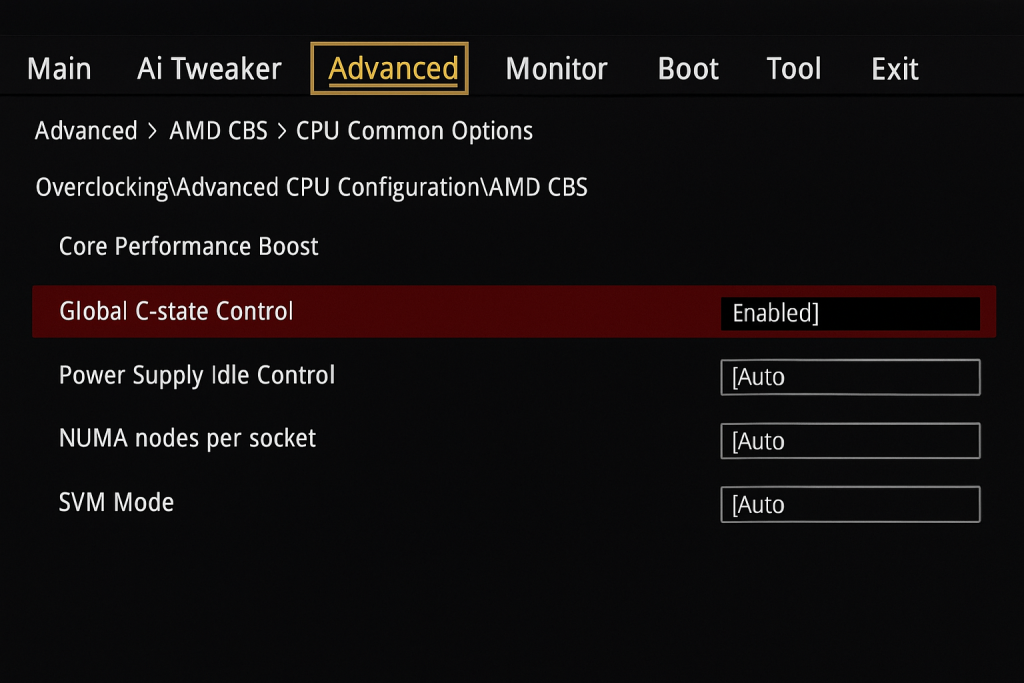
- Reboot your PC and enter the BIOS (usually by pressing DEL or F2 during startup).
- Navigate to: Overclocking → Advanced CPU Configuration → AMD CBS.
- Find Global C-State Control.
- Change the value from Auto to Enabled.
- Save and exit the BIOS.
Conclusion
Sometimes, the most effective performance fixes are hidden in plain sight. Enabling Global C-State Control in the BIOS is a quick and easy tweak that can significantly improve stability and fluidity on AMD Ryzen X3D processors. If you’ve been struggling with random stutters, try this adjustment — your gaming experience might become dramatically smoother.